Stop sending email to new user in WordPress admin registration
A code snippet to prevent WordPress to send notification emails when you manually create new users. It uses a pluggable function.
WordPress (version > 4.7) sends an email to the user when you create a new user in your back office control panel.
Have you noticed the “Send the new user an email about their account” checkbox?
It is checked by default, and when it’s checked WordPress will send an email to the new user telling him to reset its password. For security reasons, WordPress will also not send anymore the user password, even if you manually set the new password.
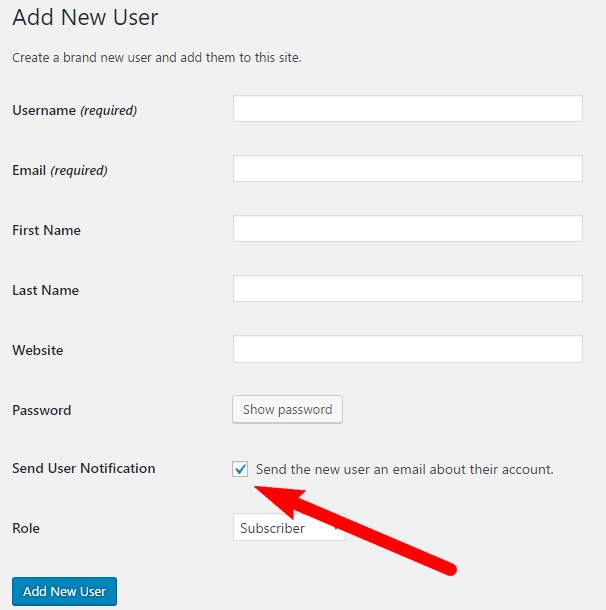
How to prevent WordPress to send the new user email about their account (without manually uncheck)
If you’re manually creating users and you forget to uncheck this checkbox the new user will receive the notification email.
This small snippet modifies the default value for this checkbox, so when you add a new user the checkbox is already unchecked.
This code hooks into the user_new_form action to add a small javascript that uncheck the default checked checkbox to send to the user a notification email about his account on your WordPress site.
add_action( 'user_new_form', 'dontchecknotify_register_form' );

function dontchecknotify_register_form() {
	echo '<scr'.'ipt>jQuery(document).ready(function($) {
		$("#send_user_notification").removeAttr("checked");
	} ); </scr'.'ipt>';
}
If you want to completely block WordPress from sending emails create this small plugin in your /wp-content/plugins directory (call it no-email.php), go in the plugins page and activate it:
/*
Plugin Name: Block email notification
Plugin URI: https://www.barattalo.it/
Description: prevent sending email notifications to users
Author: Barattalo.it
Version: 1
*/
// disable all new user notification email
if ( ! function_exists( 'wp_new_user_notification' ) ) :
function wp_new_user_notification( $user_id, $deprecated = null, $notify = '' ) { return; }
endif;
This code snippet can’t be included in your functions.php because it doesn’t work on a hook but works on core pluggable functions overwriting the existing wp_new_user_notification function.
Pluggable functions are functions declared by WordPress before your function.php file, but after plugins scripts, so you can override them from a plugin, declaring them before WordPress. You have to check if the function already exists because another plugin could have already declared and if you don’t check you got an error.
Override a pluggable function always inside a if(function_exists(...)) check to avoid errors.
To understand better the WordPress pluggable functios you can read this page.