Javascript Ruler for Google Maps v3 to measure distance on map
Javascript example for measuring distances on a Google Maps with a ruler.
[October 2019] A few years ago, I’ve made this ruler to measure distances on a Google Map, I’ve noticed it’s still a searched page so I’ve made some updates to keep it working.
The file Ruler.js contains a two functions: one is used to calculate the distance between two points on the map with their position expressed in decimal degrees, and one function that physically add the ruler to the canvas of the map. Ther ruler is composed with two standard Google markers, and a poly object is used to track the line. Two labels which show the distance are placed near the markes. The labels are placed on the map with the Labels.js class from Marc Ridley (you can reach is old blog here).
A working demo to find distance google maps is available, and you can play with it, to download the javascript files used click on these links: ruler.js, labels.js.
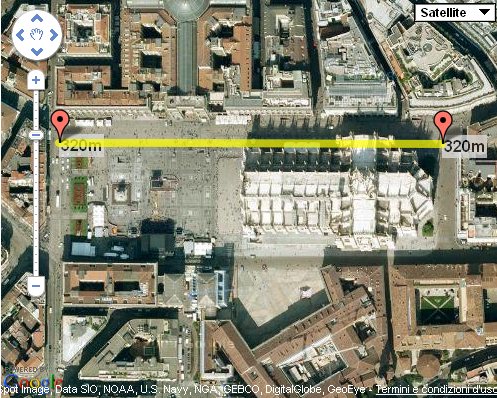
Instructions to use ruler.js
- First you have to register an API Key to use Google Maps objects in your site. When you have done this you can include Google scripts to enable maps on your site.
- In your HTML file place a
divand add an attributeidwith valuemap_canvas. Here Google will place your map. Style it with an height to see it. - On load of the page call a function to create the map. The function is simple and just declare the object of the map, the position and the initial zoom (you can find the code in the
ruler.jsfile). - Call
addruler();function to add the ruler to the map.
Here is the intial code for ruler.js with the addruler method, the file now is a bit changed and has more features:
function addruler() {

	ruler1 = new google.maps.Marker({
		position: map.getCenter() ,
		map: map,
		draggable: true
	});

	ruler2 = new google.maps.Marker({
		position: map.getCenter() ,
		map: map,
		draggable: true
	});

	var ruler1label = new Label({ map: map });
	var ruler2label = new Label({ map: map });
	ruler1label.bindTo('position', ruler1, 'position');
	ruler2label.bindTo('position', ruler2, 'position');

	rulerpoly = new google.maps.Polyline({
		path: [ruler1.position, ruler2.position] ,
		strokeColor: "#FFFF00",
		strokeOpacity: .7,
		strokeWeight: 8
	});
	rulerpoly.setMap(map);

	ruler1label.set('text',"0m");
	ruler2label.set('text',"0m");

	google.maps.event.addListener(ruler1, 'drag', function() {
		rulerpoly.setPath([ruler1.getPosition(), ruler2.getPosition()]);
		ruler1label.set('text',distance( ruler1.getPosition().lat(), ruler1.getPosition().lng(), ruler2.getPosition().lat(), ruler2.getPosition().lng()));
		ruler2label.set('text',distance( ruler1.getPosition().lat(), ruler1.getPosition().lng(), ruler2.getPosition().lat(), ruler2.getPosition().lng()));
	});

	google.maps.event.addListener(ruler2, 'drag', function() {
		rulerpoly.setPath([ruler1.getPosition(), ruler2.getPosition()]);
		ruler1label.set('text',distance( ruler1.getPosition().lat(), ruler1.getPosition().lng(), ruler2.getPosition().lat(), ruler2.getPosition().lng()));
		ruler2label.set('text',distance( ruler1.getPosition().lat(), ruler1.getPosition().lng(), ruler2.getPosition().lat(), ruler2.getPosition().lng()));
	});

}
And this is the function to calculate distance in meters (km). To change the units modify the constant using the um variable:
function distance(lat1,lon1,lat2,lon2) {
	var um = "km"; // km | ft (choose the constant)
	var R = 6371;
	if (um=="ft") {
		R = 20924640; // ft
	}
	var dLat = (lat2-lat1) * Math.PI / 180;
	var dLon = (lon2-lon1) * Math.PI / 180;
	var a = Math.sin(dLat/2) * Math.sin(dLat/2) +
		Math.cos(lat1 * Math.PI / 180 ) * Math.cos(lat2 * Math.PI / 180 ) *
		Math.sin(dLon/2) * Math.sin(dLon/2);
	var c = 2 * Math.atan2(Math.sqrt(a), Math.sqrt(1-a));
	var d = R * c;
	if(um=="km") {
		if (d>1) return Math.round(d)+"km";
		else if (d<=1) return Math.round(d*1000)+"m";
	}
	if(um=="ft"){
		if ((d/5280)>=1) return Math.round((d/5280))+"mi";
		else if ((d/5280)<1) return Math.round(d)+"ft";
	}
	return d;
}